> For the complete documentation index, see [llms.txt](https://wincl-1.gitbook.io/wincl_monitoring/llms.txt). Markdown versions of documentation pages are available by appending `.md` to page URLs; this page is available as [Markdown](https://wincl-1.gitbook.io/wincl_monitoring/wincl-monitoring-user-guide/other/setting/mangers.md).

# Manage Admins

Only authorized admin can access.

## <mark style="color:blue;">**1. Manage Admins**</mark>

### **1) Invite Admins**

<details>

<summary><strong>Invite Admins</strong></summary>

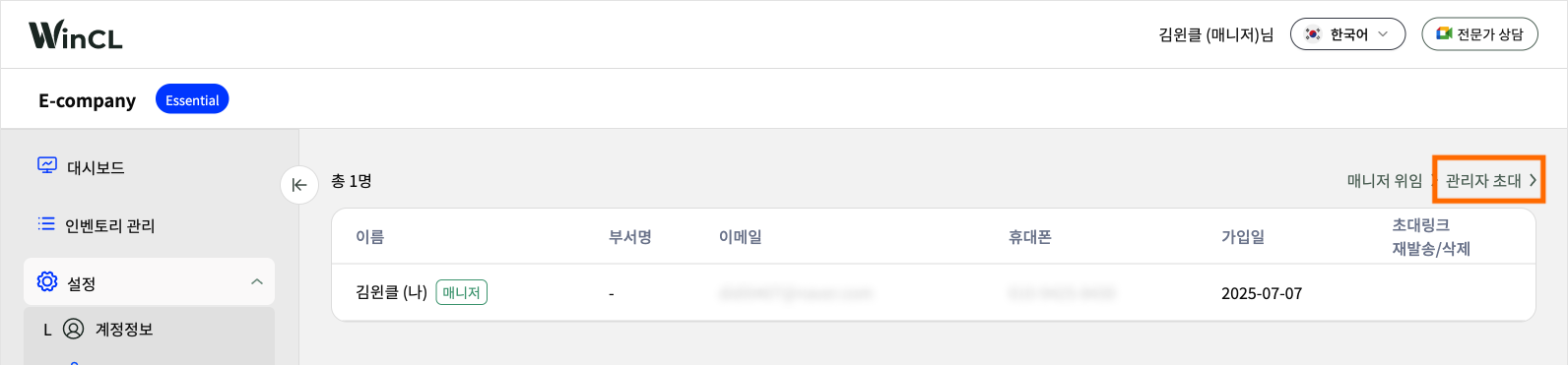
Can invite general admins without restrictions using the 'Invite Admins' button.&#x20;

**1) Click 'Invite Admins'.**&#x20;

<figure><img src="https://content.gitbook.com/content/zNinhJ4FVslFZWRfxzJX/blobs/YszutVgsHcSzSWKFTVoG/%EA%B4%80%EB%A6%AC%EC%9E%90%20%EC%B4%88%EB%8C%80%2001.png" alt=""><figcaption></figcaption></figure>

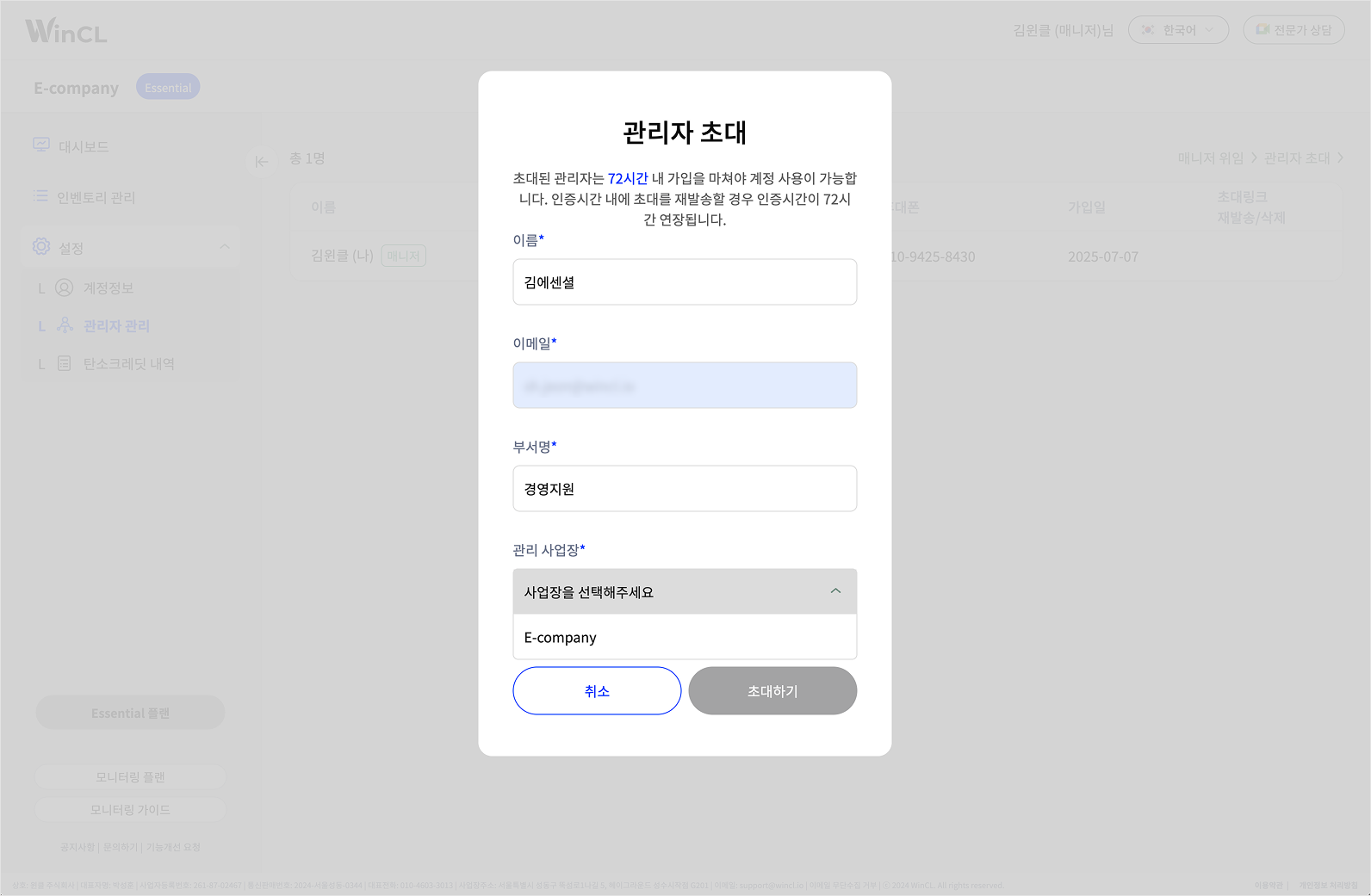
**2) Enter admin information to invite**&#x20;

Enter Name, Email, and Department and select Managing Site.&#x20;

Admin information can be edited in 'Account' in the future.

<figure><img src="https://content.gitbook.com/content/zNinhJ4FVslFZWRfxzJX/blobs/AVjfGyvs9Q1GNJYE8GOh/%EA%B4%80%EB%A6%AC%EC%9E%90%20%EC%B4%88%EB%8C%80%2002.png" alt=""><figcaption></figcaption></figure>

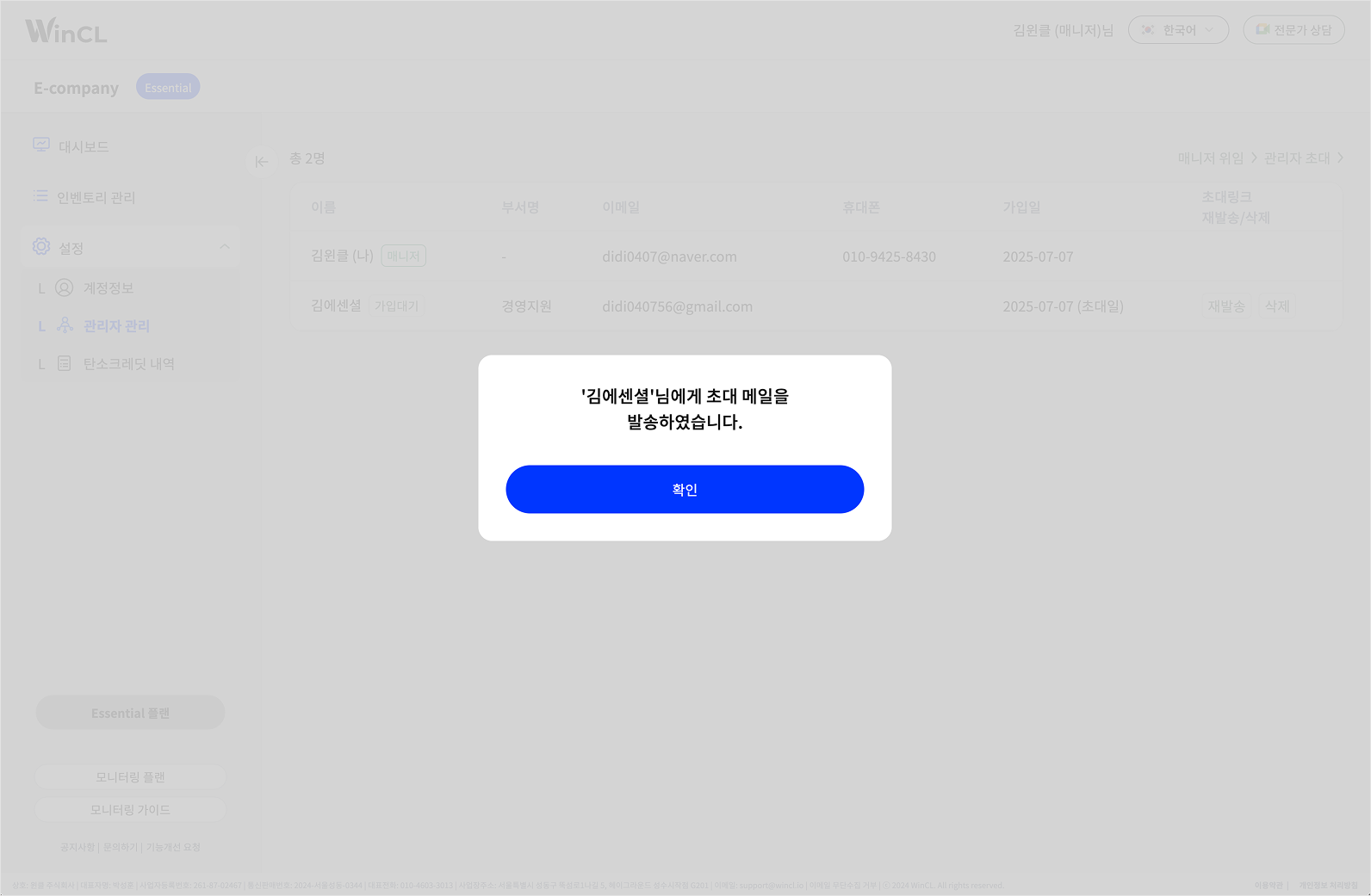
**3) Invite Completed**

Invite email will be sent to the admin invited.

<figure><img src="https://content.gitbook.com/content/zNinhJ4FVslFZWRfxzJX/blobs/5Jw5xm2bzzOxTmxVUF1K/%EA%B4%80%EB%A6%AC%EC%9E%90%20%EC%B4%88%EB%8C%80%2003.png" alt=""><figcaption></figcaption></figure>

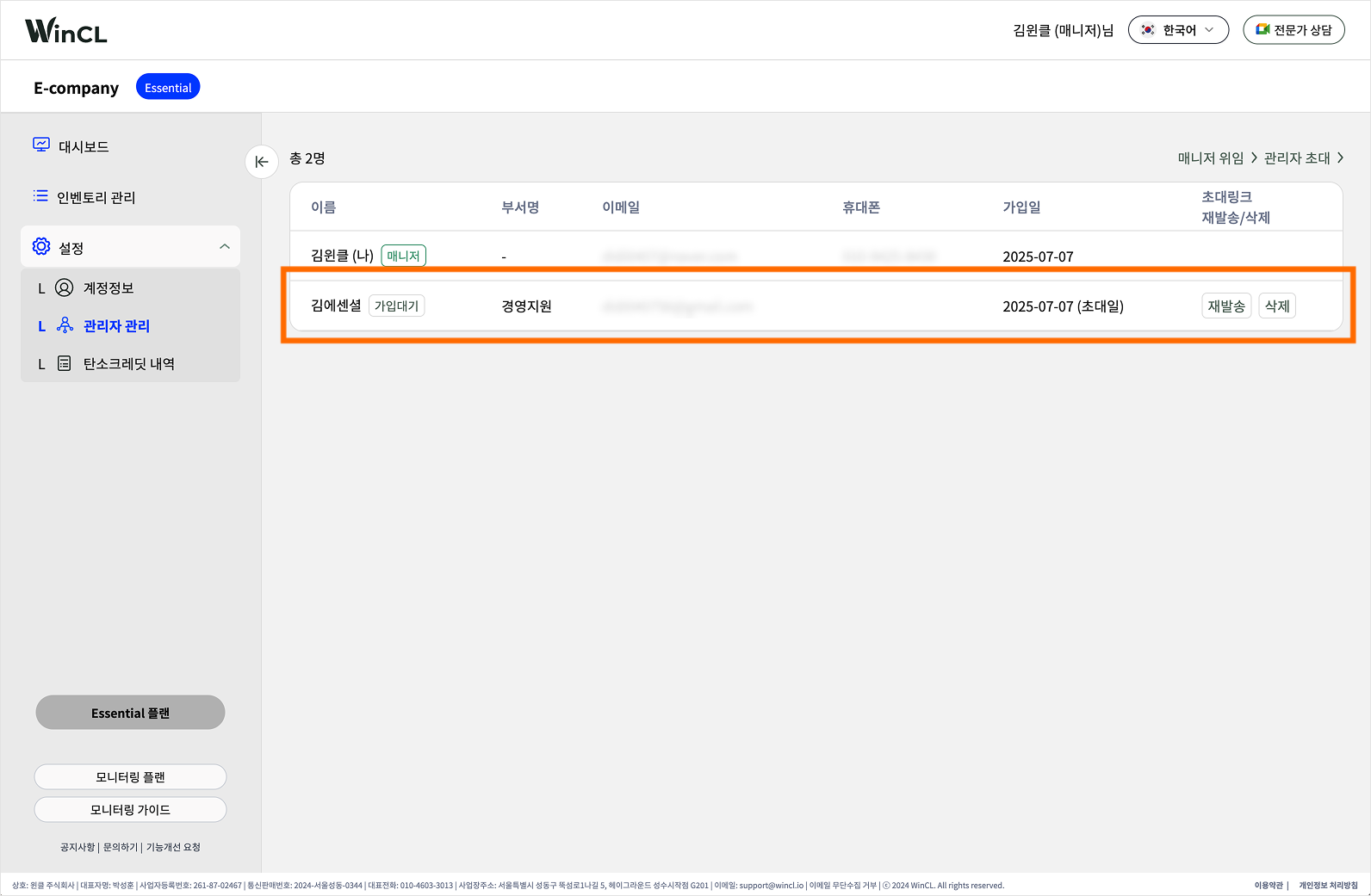
The user you invited will be added to the list with a status of \[Pending Registration].

<mark style="color:blue;">**`Resend`**</mark> : Sends the invitation email again to the invited user.

\ <mark style="color:blue;">**`Delete`**</mark> : Cancels the invitation.&#x20;

<figure><img src="https://content.gitbook.com/content/zNinhJ4FVslFZWRfxzJX/blobs/xfw25ibfNeOmsfk87BaF/%EA%B4%80%EB%A6%AC%EC%9E%90%20%EC%B4%88%EB%8C%80%2004.png" alt=""><figcaption></figcaption></figure>

</details>

### **2) Admin Sign Up**

<details>

<summary>Admin Sign Up</summary>

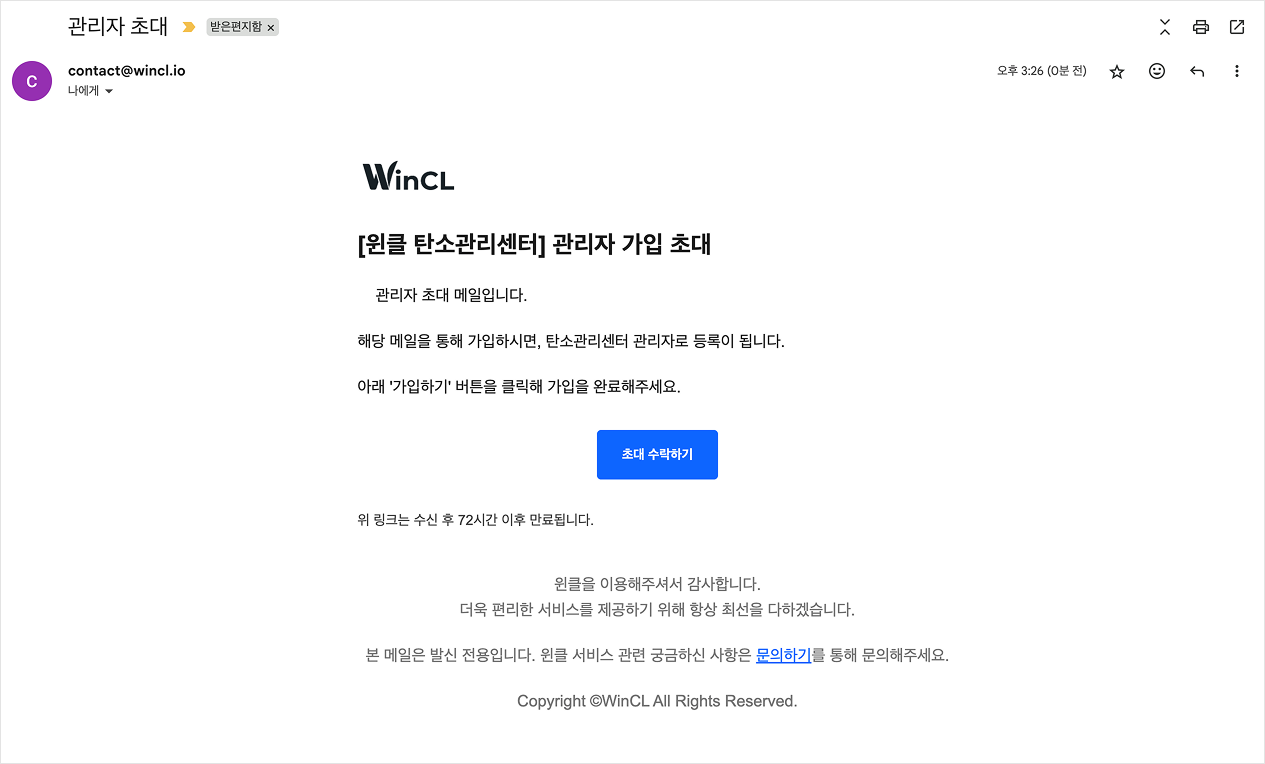
**1) Receive Invitation Emial**&#x20;

Click 'Accept Invitation' button in the email to proceed to the sign-up page.

<figure><img src="https://content.gitbook.com/content/zNinhJ4FVslFZWRfxzJX/blobs/eMMcShn5ve9XM0fZ9bJe/%EA%B4%80%EB%A6%AC%EC%9E%90%20%EA%B0%80%EC%9E%85%2001.png" alt=""><figcaption></figcaption></figure>

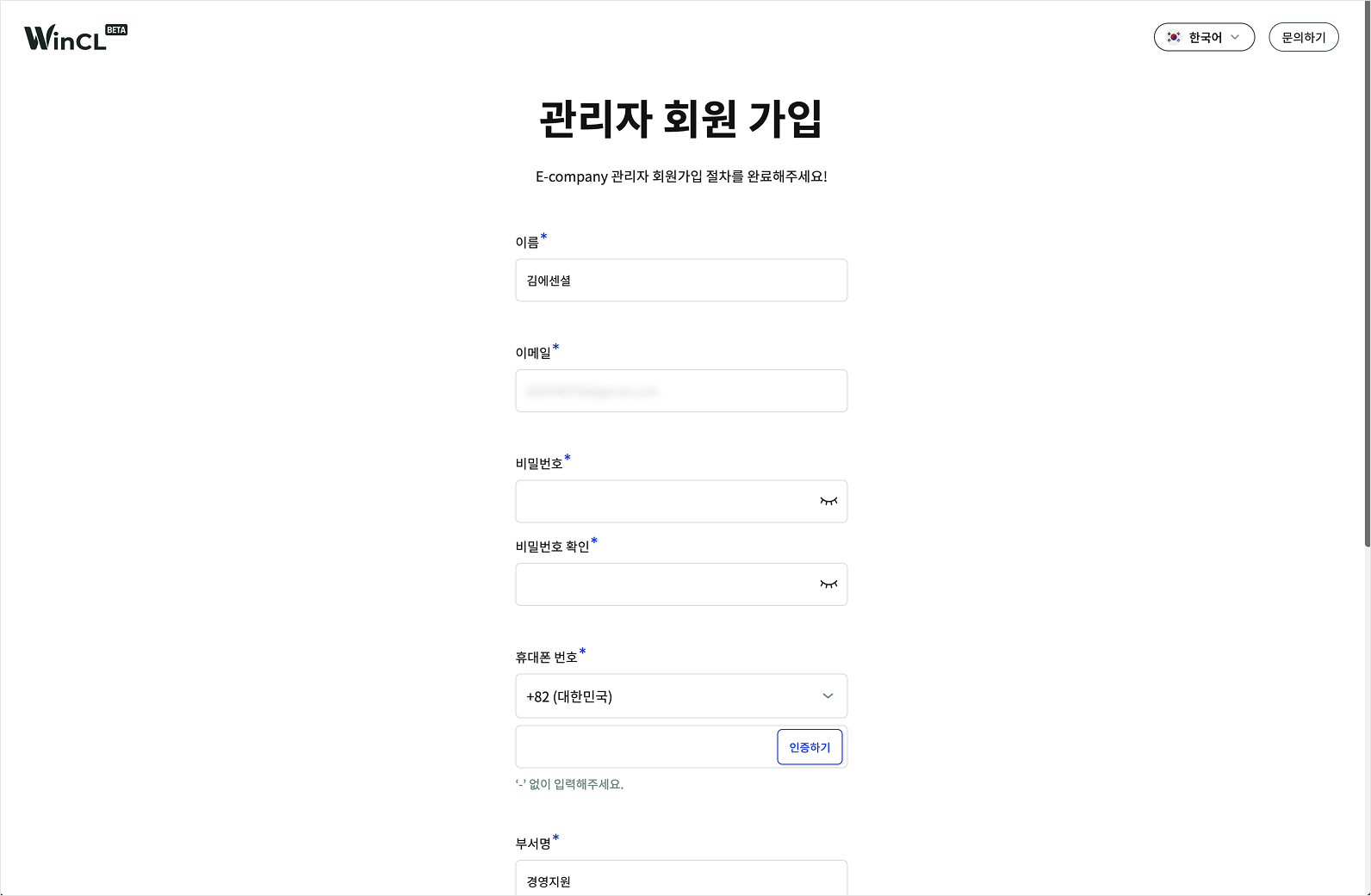
**2) Enter Information**&#x20;

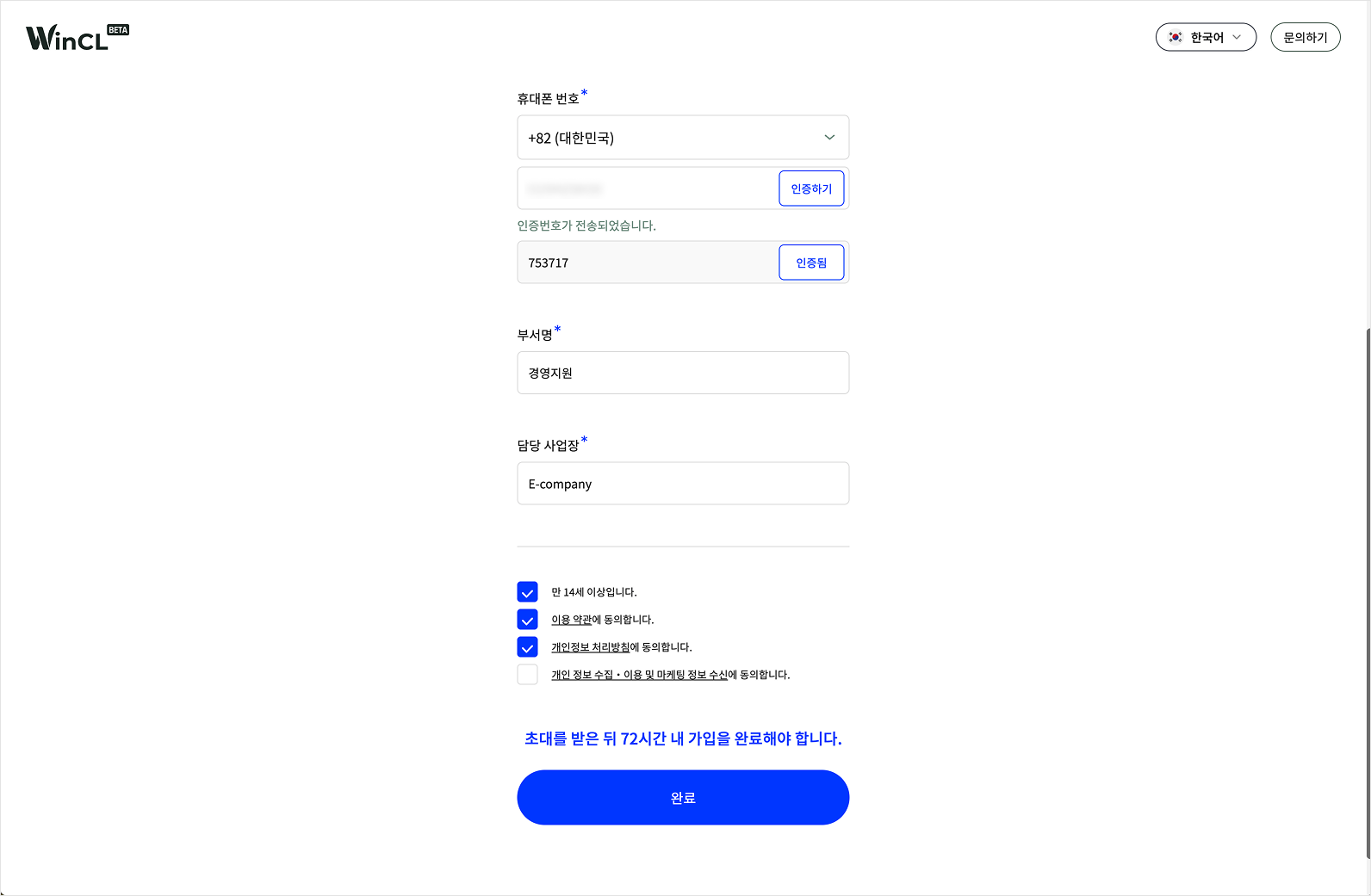
Name, Email, and Department will already be filled in. Please enter the remaining required information. Mobile phone verification is required.&#x20;

<figure><img src="https://content.gitbook.com/content/zNinhJ4FVslFZWRfxzJX/blobs/25O6mqaPfipc5Wuuc5k1/%EA%B4%80%EB%A6%AC%EC%9E%90%20%EA%B0%80%EC%9E%85%2002.png" alt=""><figcaption></figcaption></figure>

<figure><img src="https://content.gitbook.com/content/zNinhJ4FVslFZWRfxzJX/blobs/6Pcf6FwOZwShDYQVWLXI/%EA%B4%80%EB%A6%AC%EC%9E%90%20%EA%B0%80%EC%9E%85%2003.png" alt=""><figcaption></figcaption></figure>

**3) Complete Registration**

After entering all required fille, click 'Complete' to finish the registration process. You will then be redirected to the login page.&#x20;

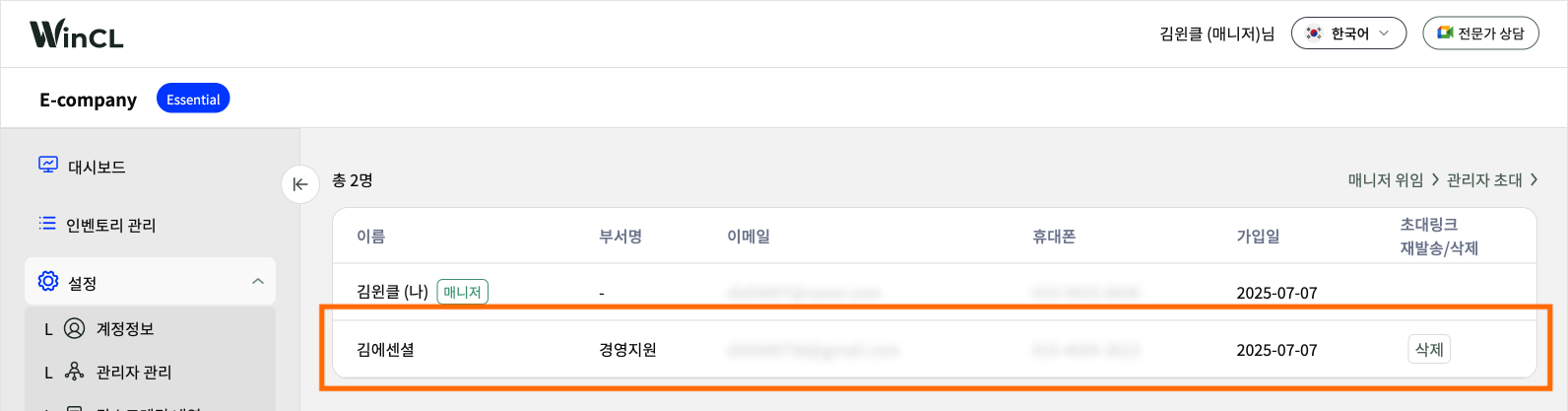
**4) Admin status is updated.**&#x20;

<figure><img src="https://content.gitbook.com/content/zNinhJ4FVslFZWRfxzJX/blobs/utnvlm3PpoLCbdXWZgcO/%EA%B4%80%EB%A6%AC%EC%9E%90%20%EA%B0%80%EC%9E%85%2004.png" alt=""><figcaption></figcaption></figure>

</details>

### **3) Delete Admin**

<details>

<summary>Delete Admin</summary>

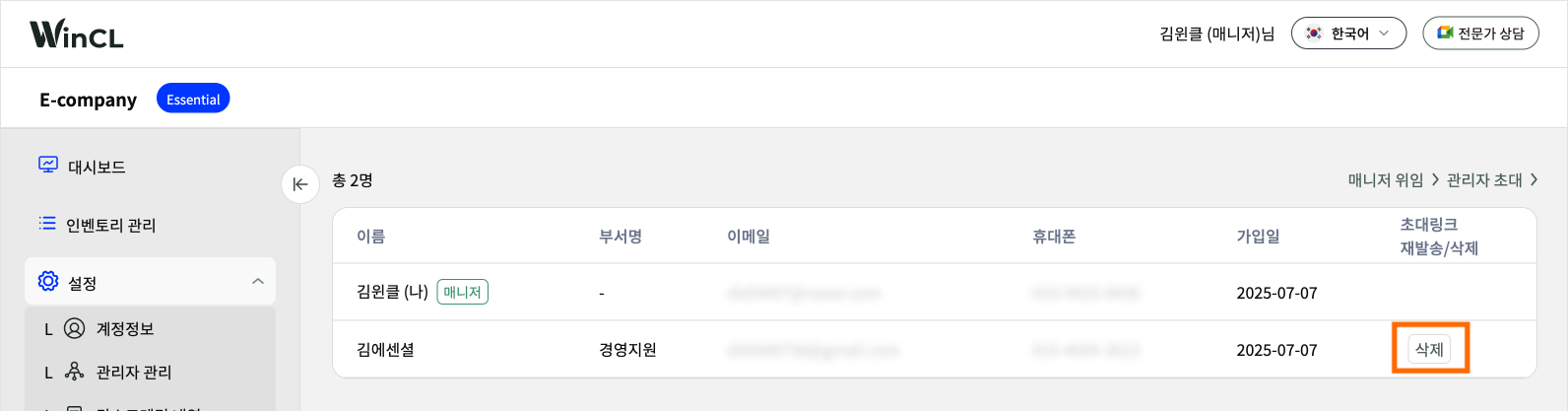
**1) Click 'Delete'**

<figure><img src="https://content.gitbook.com/content/zNinhJ4FVslFZWRfxzJX/blobs/pfiw5K0QJsItCzJGCHFE/%E1%84%80%E1%85%AA%E1%86%AB%E1%84%85%E1%85%B5%E1%84%8C%E1%85%A1%20%E1%84%89%E1%85%A1%E1%86%A8%E1%84%8C%E1%85%A6%2001.png" alt=""><figcaption></figcaption></figure>

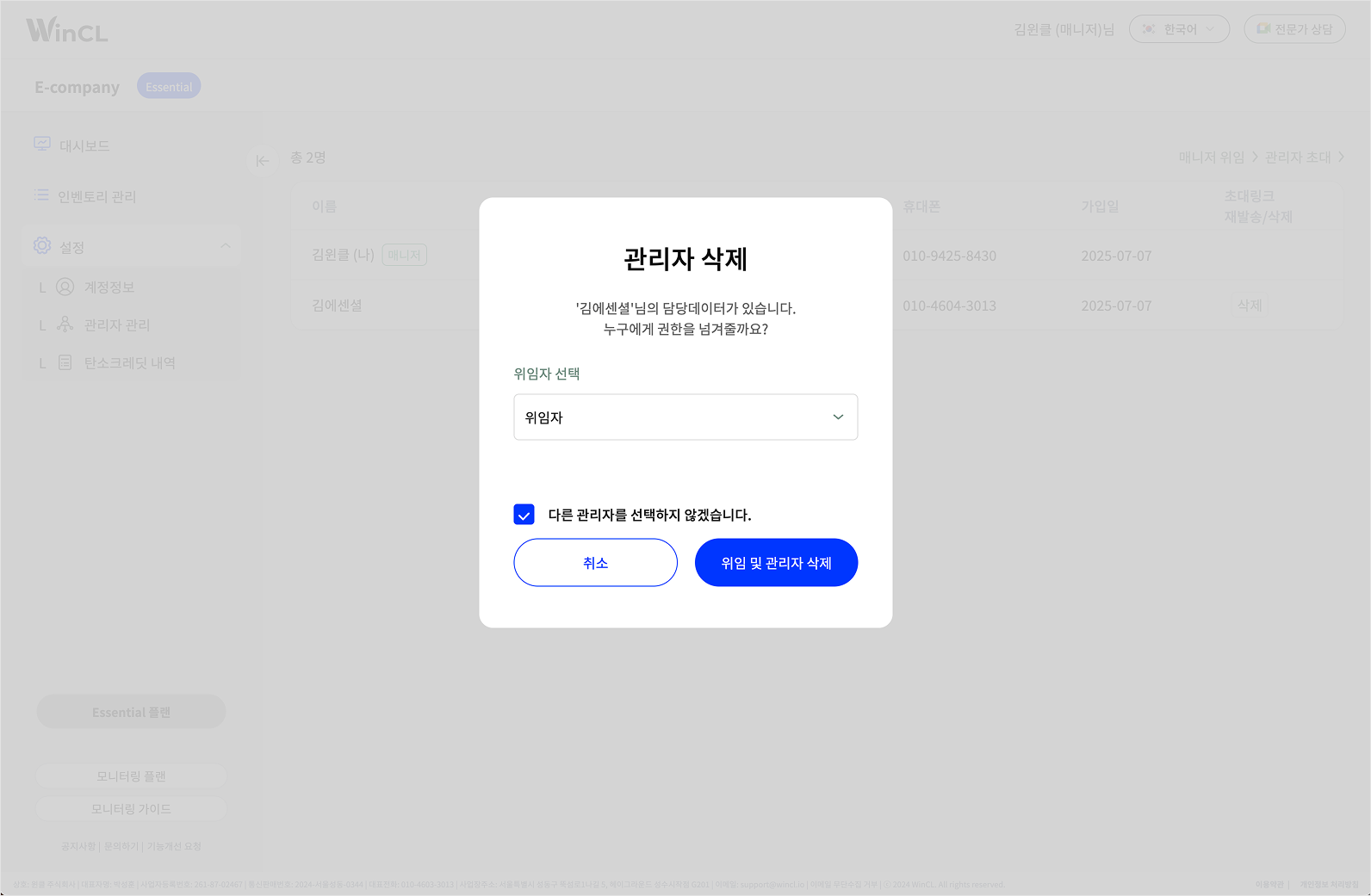
**2) Select a Delegate for Data Manager**&#x20;

When deleting an admin, choose which admin will take over the data entry tasks previously handled by the one being removed.

You may also choose not to assign a delegate.

<figure><img src="https://content.gitbook.com/content/zNinhJ4FVslFZWRfxzJX/blobs/ZGnO9OuCALdJd3frqmLs/%E1%84%80%E1%85%AA%E1%86%AB%E1%84%85%E1%85%B5%E1%84%8C%E1%85%A1%20%E1%84%89%E1%85%B5%E1%86%A8%E1%84%8C%E1%85%A6%2002.png" alt=""><figcaption></figcaption></figure>

</details>

### **4) Manager Delegation**

<details>

<summary>Manager Delegation</summary>

{% hint style="info" %} <mark style="color:red;">**Only a manager account**</mark> can delegate the manager role, and delegation can be made to a **single  registered administrator**.
{% endhint %}

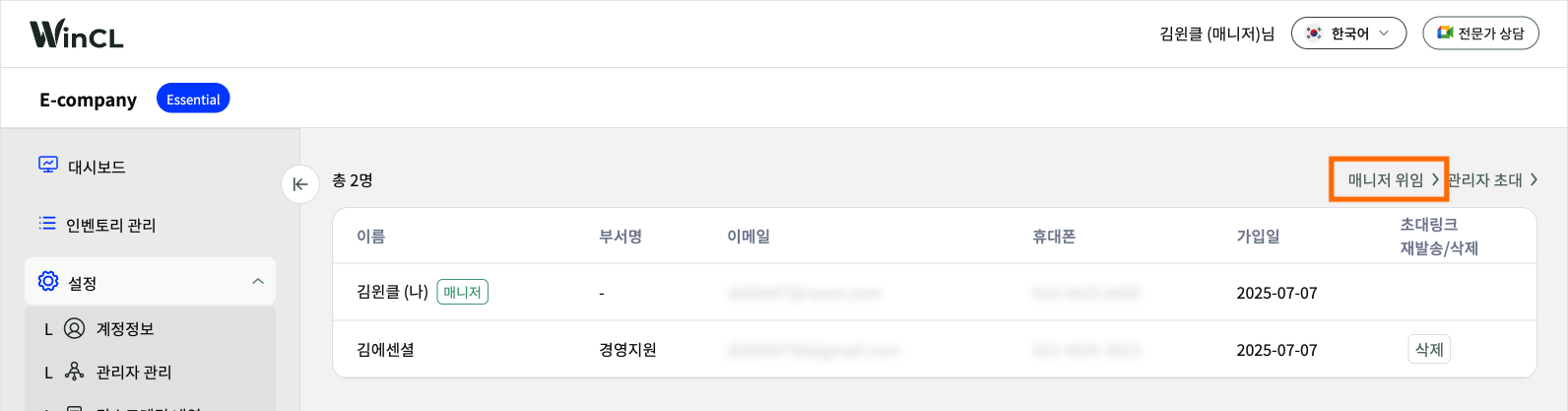
**1) Click 'Delegate Admins'**

<figure><img src="https://content.gitbook.com/content/zNinhJ4FVslFZWRfxzJX/blobs/wLaPw1mPJHEmNDhFqdEQ/%E1%84%86%E1%85%A2%E1%84%82%E1%85%B5%E1%84%8C%E1%85%A5%20%E1%84%8B%E1%85%B1%E1%84%8B%E1%85%B5%E1%86%B7.%2001.png" alt=""><figcaption></figcaption></figure>

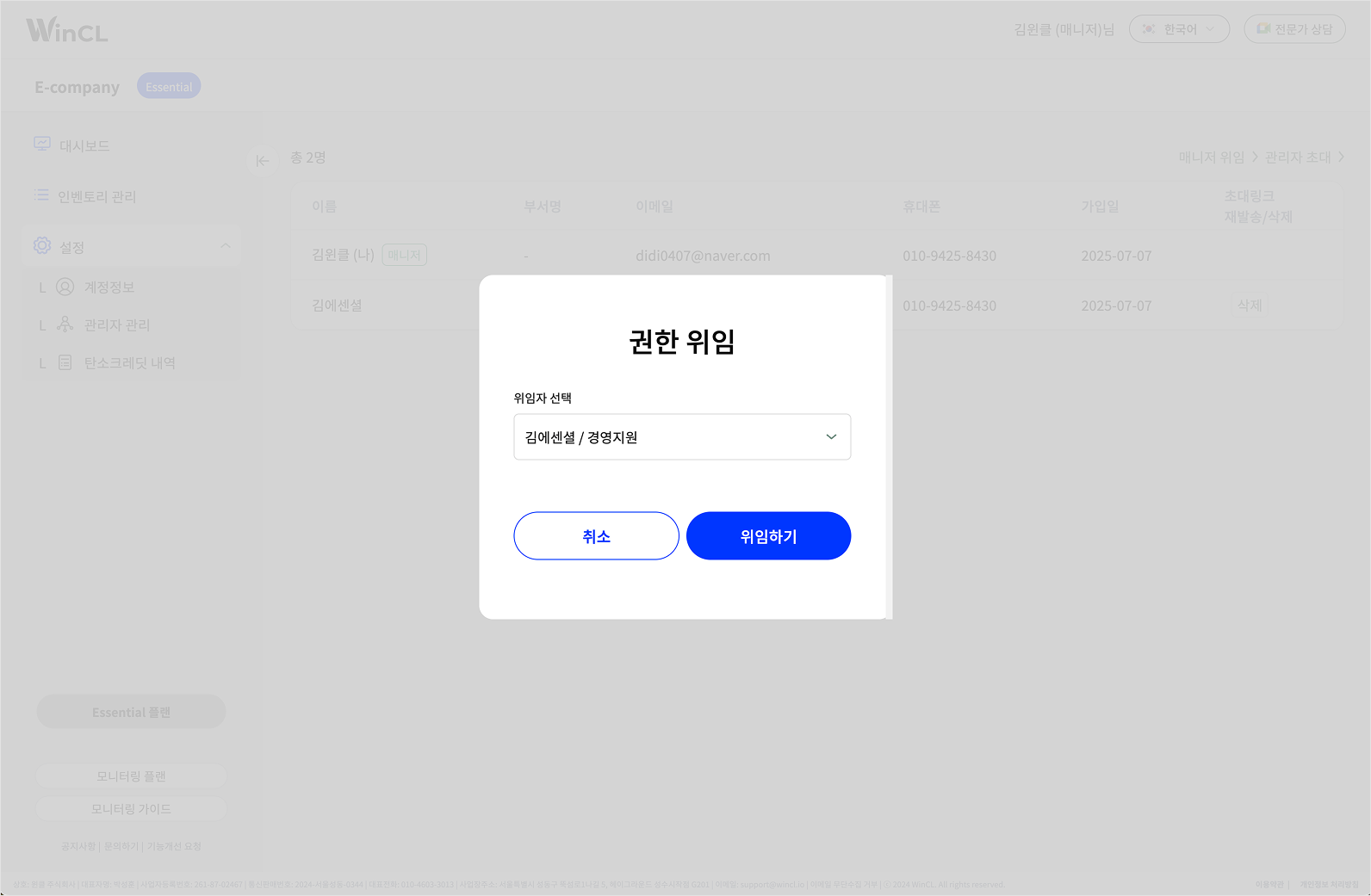
**2) Select an Authorizer**

After selecting an authorizer and clicking 'Delegate' to complete the process, you will be logged out. You will be logged in as a general admin from the next log in.

<figure><img src="https://content.gitbook.com/content/zNinhJ4FVslFZWRfxzJX/blobs/t4hLa5R3BFkuoQgwZ3uY/%E1%84%86%E1%85%A2%E1%84%82%E1%85%B5%E1%84%8C%E1%85%A5%20%E1%84%8B%E1%85%B1%E1%84%8B%E1%85%B5%E1%86%B7%2002.png" alt=""><figcaption></figcaption></figure>

</details>

***

## <mark style="color:blue;">**2. Administrator Information**</mark>

### **1) Administrator Information**

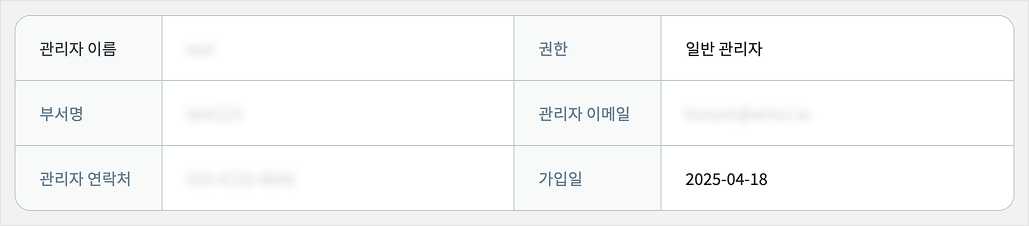
You can view the detailed information of the registered administrator.&#x20;

<figure><img src="https://content.gitbook.com/content/zNinhJ4FVslFZWRfxzJX/blobs/XEL3PbWHZo0OfafAUtBo/%E1%84%80%E1%85%AA%E1%86%AB%E1%84%85%E1%85%B5%E1%84%8C%E1%85%A1%20%E1%84%8C%E1%85%A5%E1%86%BC%E1%84%87%E1%85%A9.png" alt=""><figcaption></figcaption></figure>

### **2) 관리자 권한 설정**

<details>

<summary><strong>관리자 권한 설정</strong></summary>

권한이 있는 관리자는 각 관리자에게 권한을 부여할 수 있습니다.\
권한이 없다면 아래 권한 부여 기능 박스를 볼 수 없습니다.

<figure><img src="https://content.gitbook.com/content/zNinhJ4FVslFZWRfxzJX/blobs/82WuCNwmog5h9hmejGbB/%E1%84%80%E1%85%AA%E1%86%AB%E1%84%85%E1%85%B5%E1%84%8C%E1%85%A1%20%E1%84%80%E1%85%AF%E1%86%AB%E1%84%92%E1%85%A1%E1%86%AB.png" alt=""><figcaption></figcaption></figure>

<table data-header-hidden><thead><tr><th width="250.19140625"></th><th></th><th data-hidden></th></tr></thead><tbody><tr><td><strong>사업장 관리자 추가/삭제</strong></td><td>법인 계정에 관리자를 추가하고 삭제할 수 있는 권한입니다.</td><td></td></tr><tr><td><strong>관리자 관리(권한/삭제)</strong></td><td>가입한 관리자에게 권한을 부여하고 삭제할 수 있는 권한입니다.</td><td></td></tr><tr><td><strong>관리자 초대</strong></td><td>새로운 관리자를 추가할 수 있는 권한입니다.</td><td></td></tr><tr><td><strong>크레딧 관리(구매취소/상쇄)</strong></td><td>탄소크레딧을 구매하고 상쇄할 수 있는 권한입니다.</td><td></td></tr><tr><td><strong>데이터 관리 및 수정</strong></td><td>배출 데이터를 입력하고 수정할 수 있는 권한입니다.</td><td></td></tr><tr><td><strong>배출량 검증</strong></td><td>검증원에 배출량 검증을 요청할 수 있는 권합니다.</td><td></td></tr></tbody></table>

</details>

### **3) 사업장 관리**

관리자에게 사업장에 접근 가능한 권한을 부여합니다. 등록된 사업장이 아니면 사업장 데이터를 볼 수 없습니다.

<details>

<summary><strong>사업장 추가</strong></summary>

**1) '추가' 클릭**

<figure><img src="https://content.gitbook.com/content/zNinhJ4FVslFZWRfxzJX/blobs/bzFTMRWTIlvD5hvbckIY/%E1%84%80%E1%85%AA%E1%86%AB%E1%84%85%E1%85%B5%20%E1%84%89%E1%85%A1%E1%84%8B%E1%85%A5%E1%86%B8%E1%84%8C%E1%85%A1%E1%86%BC%2001.png" alt=""><figcaption></figcaption></figure>

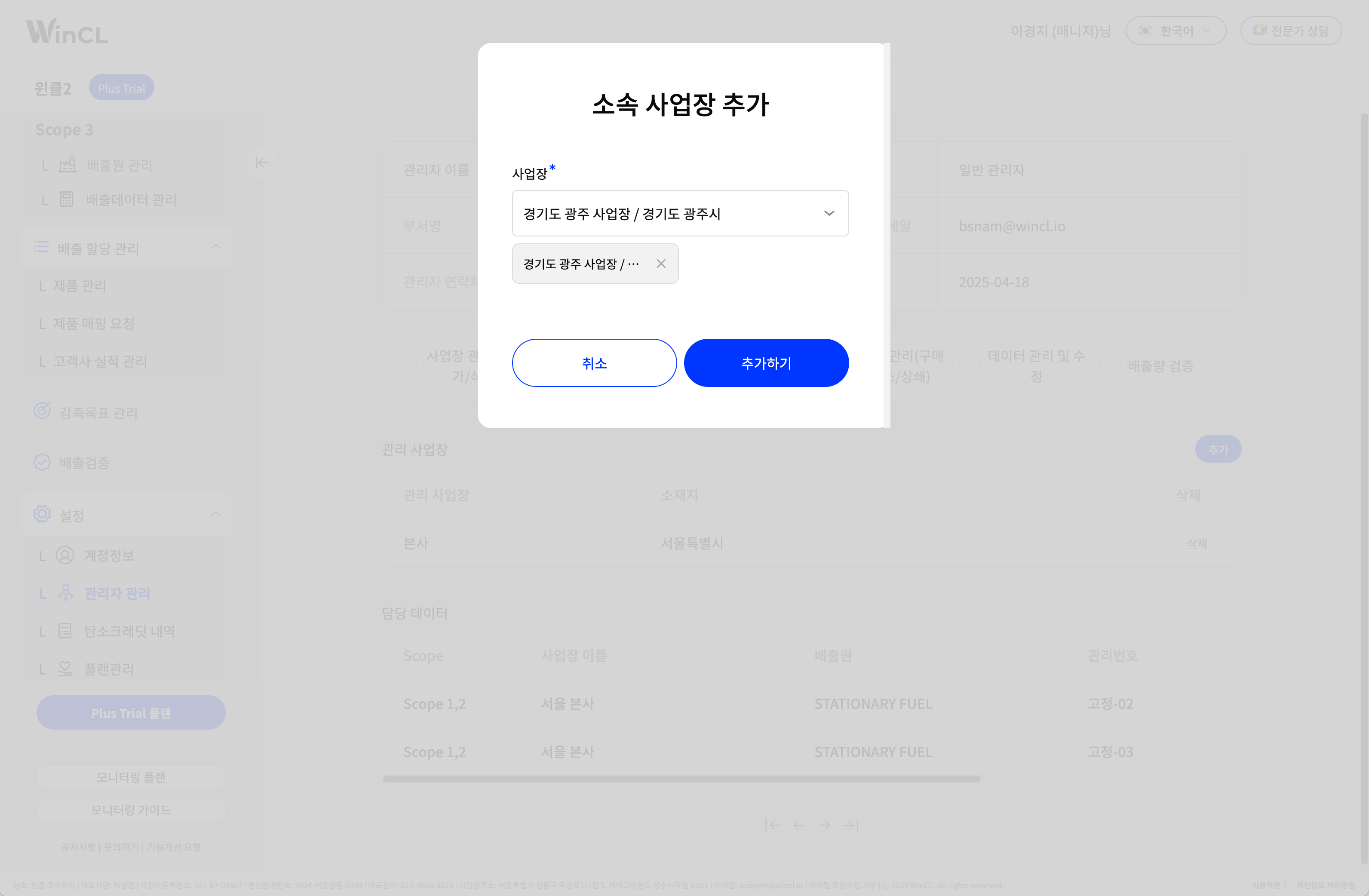
**2) 추가할 사업장 선택**

복수 선택 가능합니다.

<figure><img src="https://content.gitbook.com/content/zNinhJ4FVslFZWRfxzJX/blobs/uO1B8BfYdQMUPFGCyEiX/%E1%84%89%E1%85%A1%E1%84%8B%E1%85%A5%E1%86%B8%E1%84%8C%E1%85%A1%E1%86%BC%20%E1%84%8E%E1%85%AE%E1%84%80%E1%85%A1%2002.png" alt=""><figcaption></figcaption></figure>

</details>

<details>

<summary><strong>사업장 삭제</strong></summary>

**1) '삭제' 클릭**

<figure><img src="https://content.gitbook.com/content/zNinhJ4FVslFZWRfxzJX/blobs/g3Q2wqbGtvO2uBWQzK5T/%E1%84%89%E1%85%A1%E1%84%8B%E1%85%A5%E1%86%B8%E1%84%8C%E1%85%A1%E1%86%BC%20%E1%84%89%E1%85%A1%E1%86%A8%E1%84%8C%E1%85%A6%2001.png" alt=""><figcaption></figcaption></figure>

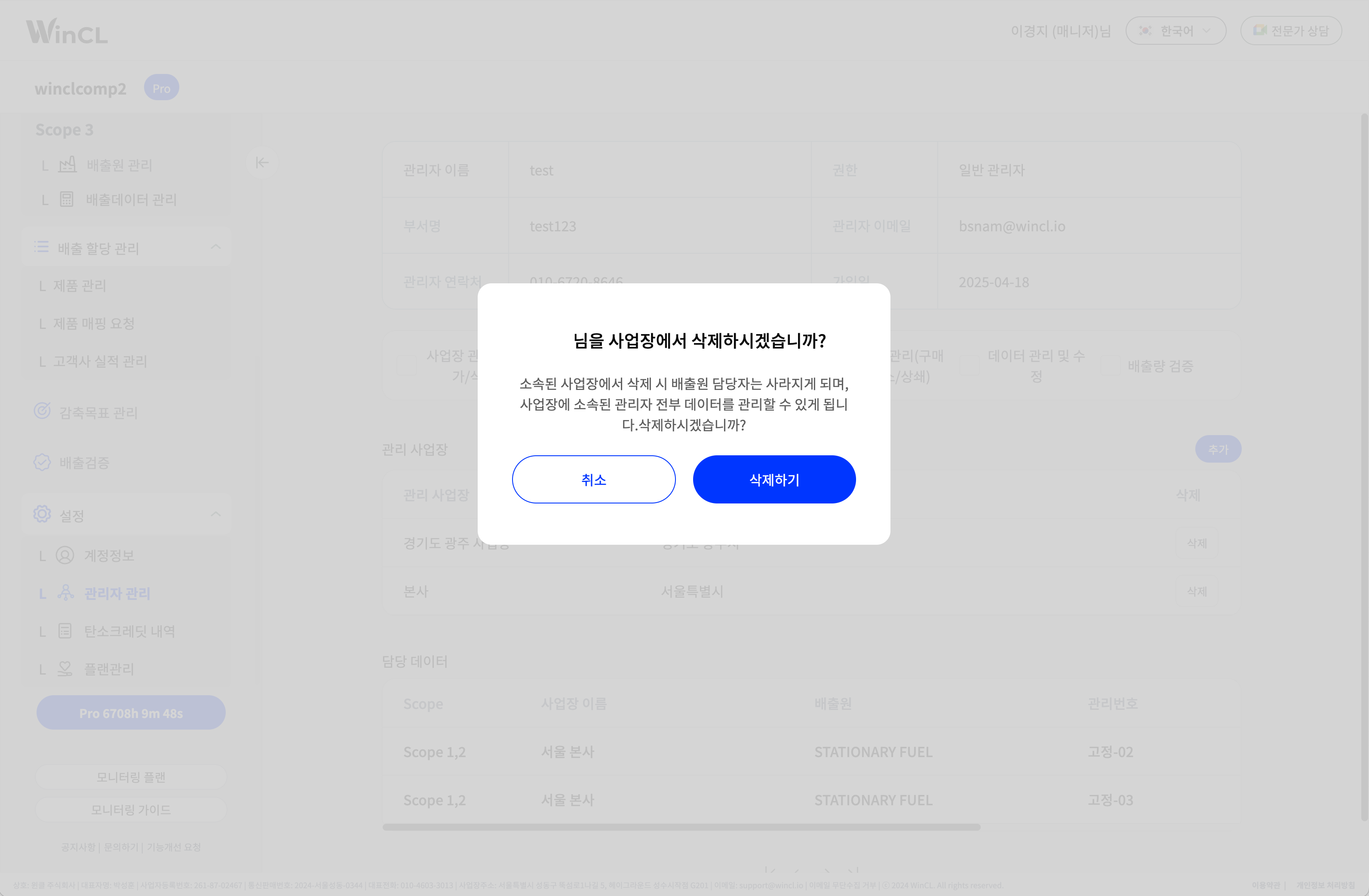
**2) 삭제 확인**

주의 사항을 읽고 '삭제하기'를 클릭하면 관리자가 사업장에서 삭제됩니다.

<figure><img src="https://content.gitbook.com/content/zNinhJ4FVslFZWRfxzJX/blobs/Lp6efZCWMdgO4Okw7y2X/%E1%84%89%E1%85%A1%E1%84%8B%E1%85%A5%E1%86%B8%E1%84%8C%E1%85%A1%E1%86%BC%20%E1%84%89%E1%85%A1%E1%86%A8%E1%84%8C%E1%85%A6%2002.png" alt=""><figcaption></figcaption></figure>

</details>

### **4) 담당데이터 확인**

<details>

<summary><strong>담당데이터 확인</strong></summary>

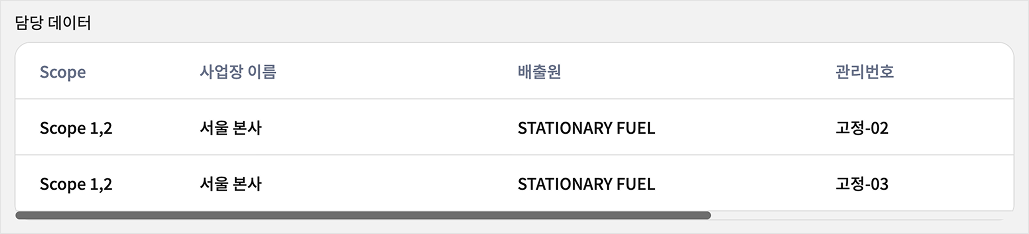
관리자가 담당하고 있는 배출원을 확인할 수 있습니다.

<figure><img src="https://content.gitbook.com/content/zNinhJ4FVslFZWRfxzJX/blobs/weCf5uY60LOUqGEPWncU/%E1%84%83%E1%85%A1%E1%86%B7%E1%84%83%E1%85%A1%E1%86%BC%E1%84%83%E1%85%A6%E1%84%8B%E1%85%B5%E1%84%90%E1%85%A5%2001.png" alt=""><figcaption></figcaption></figure>

</details>